Workflows that survive real deadlines
These sequences are distilled from sessions where the goal was “finish,” not “perfect.” They are compatible with electronic, hip-hop, and pop production styles, adapt the order, keep the intent.
-
1
Sketch in mono-first contrast
Start drums and bass with clear rhythmic conversation. Add harmony only when the groove feels undeniable. Many arrangement problems are actually “frequency masking before the song exists.”
What you leave behind
One loop-length pattern (or two) where drums and bass agree on level, plus an optional stem export labeled with date or tempo so tomorrow-you can compare honestly.
Session checklist
- One bar or one four-bar loop for the first pass: resist adding new tracks until the kick, snare or clap, and bass agree on pocket.
- Keep harmony and pads muted in the mixer until the low end feels solid in mono: collapse the master or use a mono button on your reference bus if you use one.
- Resample or bounce a rough drums-plus-bass stem when you like the feel, so you can compare later edits against a “known good” snapshot.
- If the loop fights your ears, fix timing and level before touching EQ: hot channels here often hide tuning and swing problems.
- Leave sends and width toys at neutral: a dry, controlled channel rack beats a “wide” loop that masks a weak center.
Typical trap
Spending an hour on hi-hats, shakers, and glossy pads while the kick and bass still stumble. If the center feels small, fix length and velocity of the main rhythmic anchors first.
Timebox
About 25 to 45 minutes for drums-plus-bass only. If nothing clicks, change pattern, tempo, or swing before you import new packs.
Where in FL Studio
- Keep level decisions in the channel rack and mixer while sketching: tiny fader moves beat long EQ curves when the part is not finished.
- Use one pattern length you can loop for days; stretch the arrangement later in the playlist once the pocket holds.
Done when
- You can loop drums and bass for several minutes without reaching for a new plug-in.
- A quick mono check still feels punchy when chords and pads stay muted.
If stuck
- Strip to kick, one perc layer, and bass; add the next track only after two level passes.
- Nudge swing or transpose the bass slightly before you blame the sample pack.
Handoff: enter step 2 once you still like a frozen or bounced drums-plus-bass anchor on tired ears.
Then read gain staging without the mythology before you stack more layers.
Save habit
Use File ▸ Save as with a suffix such as
_sketch_drumsbassbefore you unmute chords or wide layers.Genre agility
Trap, drill, and club rap still need the same center rule: fewer elements, firm kick-and-bass dialogue, then rolls and perk layers.
Reality checks
- Phones and laptop speakers forgive wide bass less than headphones: if only cans feel good, the center may still be weak.
- Close background recorders and heavy tabs if the buffer jitters while you loop: a stable pass beats one more perc layer.
Next session
Import yesterday’s drums-plus-bass stem beside the live pattern, match loudness, then unmute chords only after the stem and live version agree on punch.
Optional stretch
- Share a 30-second loop MP3 with one trusted ear before you arrange: “boring in a good way” usually means the center is healthy.
- When comparing kits, copy tempo and swing into a blank project so the grid stays identical and only the samples change.
More · drills and field notes
- Velocity ladder: program hi-hats in three passes—ghost layer, pocket layer, accent layer—so swing survives before you open the swing knob.
- Kick vs. bass truth test: solo kick and sub together at low volume; if the kick “disappears,” sidechain earlier or shorten the sub release instead of cranking highs.
- Field note: bounce a mono-collapsed MP3 beside your stereo mix: phase-heavy hats and wide claps show up faster when the image collapses.
-
2
Commit structure before sound design rabbit holes
Loop sections are comfortable; full arrangements are honest. Duplicate patterns into an intro, build, drop, and outro while sounds are still simple. Sound design shines on a skeleton that already moves.
What you leave behind
A playlist that reads like a song draft: named clips, markers at section edges, and CPU relief from frozen or bounced MIDI where arrangement matters more than tweaking notes.
Session checklist
- Duplicate your main pattern into new playlist clips and label them in plain language: Intro 8 bars, Build, Drop A, Break, Drop B. Rename mixer tracks to match before colors, not instead of names.
- Freeze or bounce MIDI you are done tweaking so CPU stays calm while you arrange; keep a hidden MIDI pattern or backup if you might revisit notes.
- Cut or mute whole sections for thirty seconds: if the song still reads, the structure is working. If not, the problem is placement, not the snare sample.
- Save a versioned project file before destructive deletes or major consolidation so “try a radical arrangement” stays reversible.
- Put a marker at each section change with the same words as your clip names: searching the timeline beats scrolling blind.
Typical trap
Auditioning twenty snares or kicks while the project is still one eight-bar loop. Pick temporary drums, nail the map, then commit to tone.
Timebox
One pass of 40 to 70 minutes for a full rough map with “ugly but readable” sounds. If you open a synth editor, ask whether the playlist length grew first.
Where in FL Studio
- Playlist clips and track lanes: duplicate patterns instead of mutating the only copy you rely on.
- Mixer: route early groups (Drums, Music, Vocals) even with placeholder levels so mutes during arrangement stay predictable.
Done when
- A listener can describe intro, build, and drop without waiting for a perfect sound-design pass.
- The playlist scrolls smoothly because heavy MIDI is frozen or bounced before you paint detail.
If stuck
- Duplicate the loop into a “B part” that removes one layer instead of stacking three new ones.
- Mute the newest ear-candy layer: if the song collapses, the drama came from toys, not structure.
Handoff: move to step 3 once the story reads at low volume with rough mixer faders.
Pattern lab: iterate without chaos pairs well with this step when clips multiply.
Save habit
Before you delete large regions, Save as
_before_arrangement_surgeryor duplicate the whole project folder if backups are your religion.Genre agility
Singer-songwriter sessions: verse and chorus clips behave like EDM sections; lyric delivery maps to energy arcs you already labeled in the playlist.
Big-picture routes on the site: five situations in the guide.
Reality checks
- Play from bar one without solo cheating: solo lies about whether the story survives the real mix.
- If the playhead stutters, freeze or bounce the heaviest instruments before you paint transitions and FX throws.
Next session
Solo drums plus one “story” instrument, then unmute sections in order like a short set list: gaps in energy show up immediately.
Optional stretch
- Fake variety: duplicate a verse playlist clip, mute one layer in the copy, and call it “verse B” before you record new material.
- Reserve a blank labeled region on the vocal lane for comp notes so dialog edits stay visible before you punch in.
More · drills and field notes
- 32-bar read: play only the first half of the drop, jump to the bridge, then hit the final hook; if you get lost, markers—not new sounds—are the fix.
- “Minus one” bridge: duplicate the chorus clip, mute the widest pad or ear-candy layer in the copy, and treat that thinner pass as your first bridge sketch.
- Color convention: pick one playlist color for “confirmed structure” clips and another for “experiments” so reckless deletes stay obvious.
-
3
Automate last mile emotions
Filter sweeps, subtle reverb throws, and one-decibel vocal rides are the difference between “good loop” and “record.” Keep automation lanes tidy: name clips, use consistent curve types, and avoid fighting the compressor with wild volume swings.
What you leave behind
Automation clips you can identify by name, a short listening note on paper or phone, and at least one dated reference bounce outside the project so A/B survives email and chat.
Session checklist
- Automate sends and filters before you chase “one more master plug-in”: listeners feel motion from filter, space, and level rides.
- Keep big vocal level moves in clip gain or pre-fader automation; let the compressor handle small, fast content so rides stay musical.
- Name automation clips after the emotion or section, not “Knob 3”: you will thank yourself when the project opens in six months.
- Bounce a reference MP3 after a pass, listen away from the screen, and note only three fixes before you touch the DAW again.
- Print one “dry-ish” and one “effects-heavy” bounce if you sidechain or duck heavily: compare which story the vocal tells in the car.
Typical trap
Wide, fast volume automation that fights your compressor and lifts noise between words. Shape tone with EQ and clips first, then ride micro-dynamics.
Timebox
One focused “emotion pass” of 30 to 50 minutes, then a listening break. If you keep past that window, you are often rearranging, not finishing.
Where in FL Studio
- Automation clips: right-click a parameter, create clip, and keep curves consistent (hold, sine, single steps) inside one section.
- Edison or export sounds: capture before-and-after stems so A/B stays honest when you reopen the project tomorrow.
Done when
- Small speakers still show phrase endings without random jumps in vocal level.
- Your note list after a car listen names sections, not vague “make it better.”
If stuck
- Bypass the master chain temporarily: if drama returns, fix inserts before more clip rides.
- Solo stems one by one for clicks, noise, or masks before another emotional pass.
Handoff: export a dated bounce, park it in your library, and schedule the next touch before you rewrite the intro again the same night.
Ducking habits: Sidechain that breathes.
For a printable pass, see finishing tracks: a ruthless checklist.
Save habit
Group automation-heavy tracks by color or playlist lane name (for example “Moves”) so you can mute all motion for a dry balance check in one gesture.
Handoff outside the DAW
Sending stems or demos elsewhere? Align words like “stem,” “freeze,” and “dry print” with collaborators using collaboration and handoff in the site guide.
Reality checks
- Export glitches often sit on clip edges: zoom until fades and trims look clean before you blame the limiter.
- Match loudness against a quiet commercial reference: “who is louder” hides tone problems.
Next session
Open the song once with every automation lane muted, confirm balance, then unmute your “Moves” group section by section.
Bounce and stem questions: FAQ on export.
Optional stretch
- One ear-candy return on the hook only (delay throw, filter open): small moves read as “finished” when everything else stays stable.
- Print a “screening mix” with lead vocals slightly louder if your listener always plays demos on phone speakers in noisy rooms.
More · drills and field notes
- Curve vocabulary: stepped moves for mute and pattern switches; smooth curves for filter, reverb sends, and slow width rides—mixing styles in one clip invites ear fatigue.
- Pre-fader vs. post-fader sends: automate sends pre when you want “space grows with level”; keep delay feedback post when tails should stay stable as you trim vocal clip gain.
- Silence audit: loop two bars of “air” between phrases; clicks, noisy comps, and room rumble surface before you print the dated bounce.
Piano roll as a composition notebook
Treat each pattern as a page. When an idea conflicts, duplicate the pattern and try the variation on the new page, never destroy history unless you are certain. This habit alone prevents the “I lost the better version” crisis.
What you leave behind
A stack of clearly named patterns (or MIDI plus matching audio trims) so the best hook is never buried in “Pattern 47.”
Habits that scale
- Use ghost notes or a dimmed MIDI reference layer when you rewrite a line so timing comparisons stay honest.
- Color is a backup label: the pattern name and playlist clip text should still make sense in grayscale.
- When piano roll zoom becomes archaeology, bounce the part to audio, trim in the playlist, and park the MIDI on a muted pattern for recall.
- Quantize in stages: rough strength on the first pass, then manual nudge on only the notes that carry the groove.
Five-minute piano roll loop
- Duplicate the pattern; name the copy with the date or idea tag.
- Edit only the new pattern; leave the old one untouched for A/B.
- Bounce both to audio when you cannot decide: level-match, then pick in the playlist.
Sample and browser angle
Favor one folder of one-shots per session so auditioning does not become a second hobby. Deeper browser habits sit in sample packs and originality.
Done when
Every active pattern has a readable name, and you can reopen yesterday’s take without opening five mystery clones.
Handoff
Lock melody and harmony into labeled playlist clips before you chase another preset folder for “inspiration.”
If stuck
- Turn off metronome and draw one bar by hand: mechanical grids often hide phrase problems.
- Transpose the whole phrase ± semitone as a throwaway pattern copy; keep the original muted nearby.
Features tour for where piano roll meets playlist and mixer in one mental map.
Save habit
When a pattern earns keeper status, rename it in the picker and, if you use project notes, log it as HOOK_YYYYMMDD instead of “final_final.”
Step sequencer sidenote
Drums born in the step sequencer still deserve the same naming discipline before melodic layers pile on.
Reality checks
- Hear chords at moderate velocity first: harmony should survive before you paint crescendos.
- Bounce hungry MIDI lines to audio before you stack tenth insert: the playlist stays lighter for arrangement passes.
Next session
Pick the worst-named pattern from last visit, rename or merge it, then add only one musical bar before you open the browser.
Optional stretch
- Duplicate a melody pattern, delete every note except downbeats: a thin reference skeleton for phrase length without harmonic noise.
- Record a chord strum in one pass, quantize gently, then humanize only the top voice so harmony stays locked under lead motion.
More · drills and field notes
- Inversion copy: duplicate a chord stack pattern, raise or lower one inner voice by an octave-only move, and A/B as audio in the playlist before you rewrite melody.
- Micro-offset hook: nudge the last note of a phrase 5–15 ticks early or late without touching the rest so cadences feel human without smearing the grid.
- Length discipline: if the piano roll scroll exceeds ~16 bars of content, duplicate to “Part B” and mute the first half so edits stay on-screen.
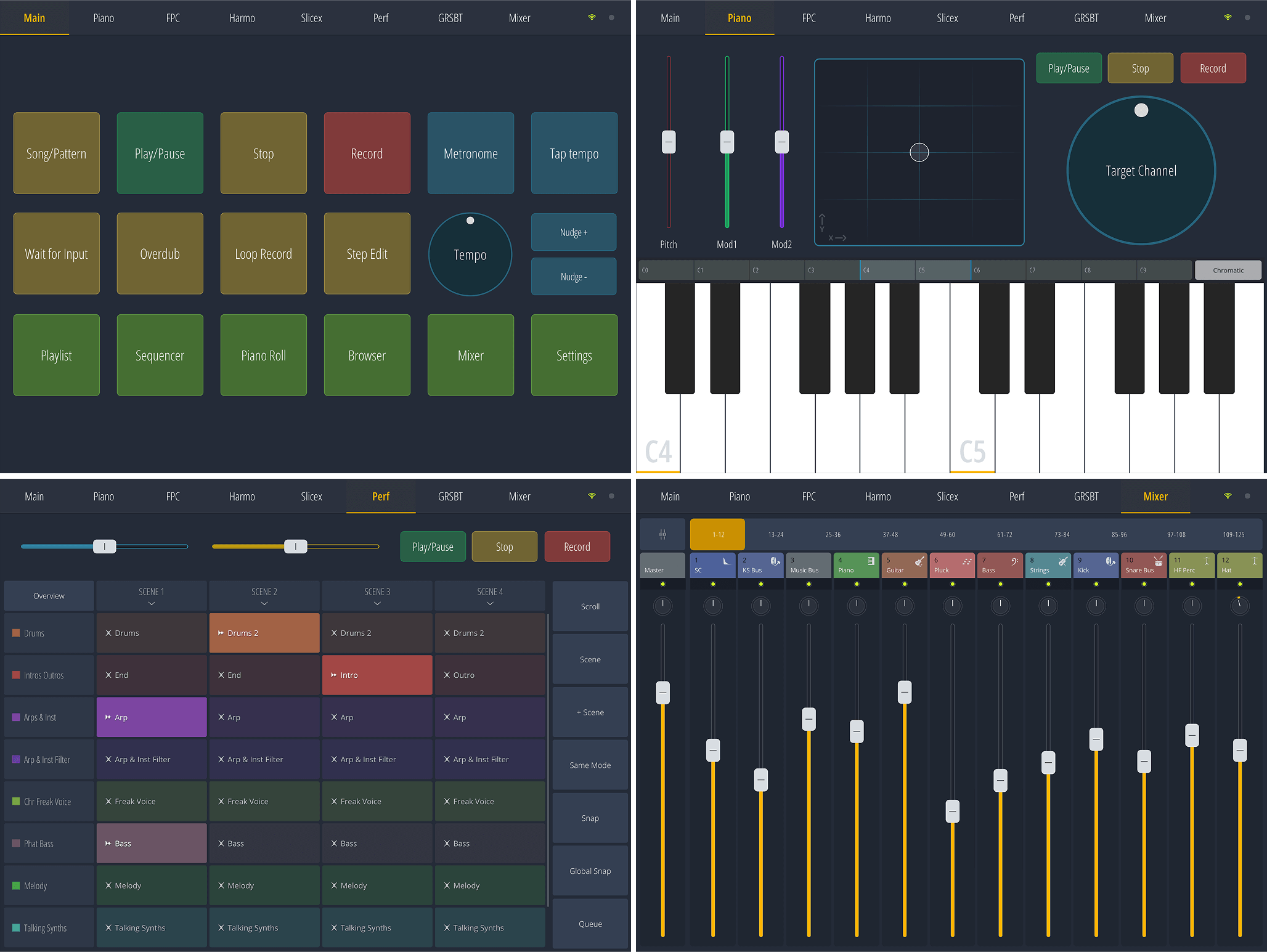
Remote control and second-screen workflows: keep transport, mixer banks, and quick mute/solo at your fingertips away from the main display so the big screen stays for editing detail.
What you leave behind
A saved Remote layout, a short list of which tracks you rode, and a main project where those fader guesses became real mixer moves.
Quick setup habits
- Assign a consistent layout on the phone or tablet: play/stop first, then faders you touch every session so muscle memory sticks.
- Use Remote for level rides during playback tests, not for deep automation drawing: finish detail at the desk.
- If Wi-Fi drops, fall back to wired MIDI controllers for transport only rather than chasing network gremlins mid-session.
- Dim the main monitor when you test balances: ears first stops the Remote faders from chasing bright meters only.
When Remote shines
Playback tests in another room, live mute drills with collaborators, or quick level trims when the mouse hand is tired. It is a remote control, not a second DAW.
When to skip it
Detailed piano roll surgery, precise automation curves, or sample chopping: stay at the desk so shortcuts and tools stay under your fingers.
Same-room sanity
- Charge the tablet, silence notifications, and match screen brightness to the room so fader moves stay about sound, not glare.
- Save a snapshot layout in Remote after you like it: rebuilding every session burns focus.
Handoff
Note the three faders you touched most on Remote, then mirror those decisions in the main project so the desk session continues where the couch session stopped.
After Remote
Open the project fresh, play once without touching the mouse, and write one sentence, for example “Still too loud: vocals in chorus” so the next sit is concrete.
Reality checks
- Expect network latency: treat Remote as balance and mute drills, not the court of transient truth.
- Noisy room? Log “needs car or hallway test” instead of hairline fader moves you cannot actually hear.
Next session
Rebuild the same Remote page layout before you press play so the first minute goes to listening, not hunting buttons.
Optional stretch
- Enable airplane mode on the tablet during long tests if banners steal your attention.
- Screenshot or photograph a layout that worked after an OS update: rebuilding muscle memory from memory alone wastes opening minutes.
More · drills and field notes
- Latency rehearsal: tap play on Remote, count how long audio starts, and adjust expectations so “late” stops feeling like you forgot a move.
- Mute ladder: during one pass, mute one group every eight bars in order (drums, pads, ear candy) and log which removal hurt the most—that is your balance homework back at the desk.
- Handoff naming: in project notes, paste the Remote session date plus three fader guesses (“hi-hat bus −1.5 dB feels calmer”) so the desk session does not re-argue the couch.
Visual learners: interface walkthroughs.
Stability questions: FAQ on buffer and drivers.
More “I wish I knew sooner” moments: producer stories.
Three flows at a glance
Use this as a rail when the page feels long: each row is the contract for that phase.
- 1 · Sketch (mono-first)
- Drums plus bass tell the truth, chords wait, stems archive the pocket, gain discipline before width.
- 2 · Structure (map before gloss)
- Playlist length and markers beat snare shopping, frees and backups keep CPU and courage high.
- 3 · Motion (automation and finish)
- Sends and rides before master mysticism, named clips, dated bounces, words that survive email with collaborators.
Editorial hub: site guide · full blog index.