Arrange
Name before you decorate
Patterns, clips, and mixer tracks that read like a sentence beat cryptic “Audio 47” every time you reopen a project. Color is a backup label, not the primary one.
Workflow ideasIndependent production guide
Screenshots and walkthroughs; workflows and fixes for your next session, less noise, fewer dead ends.
Quick win
Color mixer tracks by role first, routing stays obvious.
Warm-up
About ten minutes to quiet surprises: stability, readable tracks, honest level, one real listen. Stock tools only.
Set the buffer you actually mix with, kill screen recorders and tab farms, then loop the bar that glitched once to prove it is gone, not “probably fine.”
FAQ: crackles & driversThree roles in plain English—drums, harmony, lead vocal (swap for today’s session). Rename before you recolor so grayscale still reads.
Guide: shared wordsDrop a finished track in, match loudness to your rough mix, then judge tone and low-end marriage—not who wins the loudness war.
Gain staging without hypeKick plus bass for one phase check; vocals alone for esses and breath; full mix at chat volume for the only verdict that counts.
Features: playlist & mixerReality check
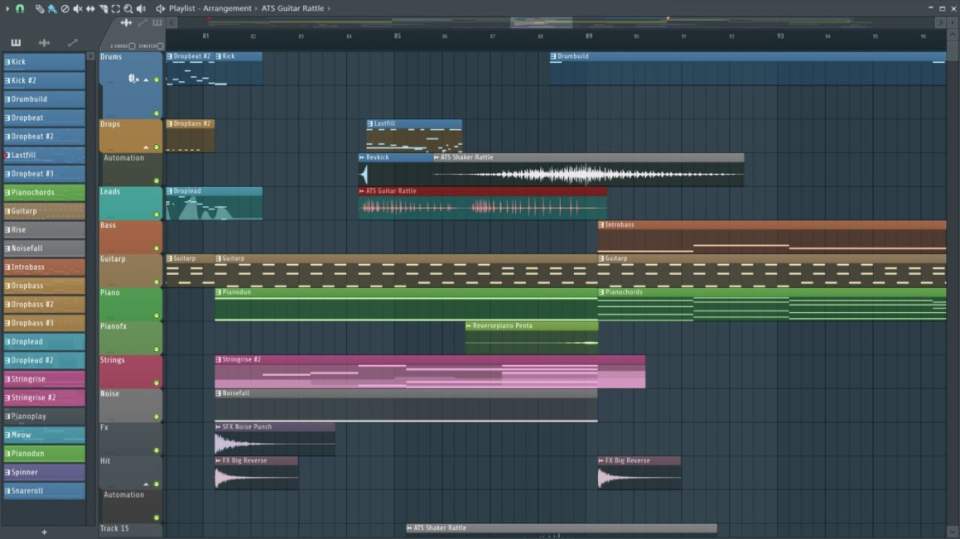
Most stalls are boring: buffers, naming, hot channels, or fear of arrangement. This hub stays close to the real window layout so advice maps to buttons you can find.
Start with one lane (sketch, mix rescue, or finishing), then stack habits. The editorial guide explains how the site is organized, what we do not claim, and where to click first when you are overloaded.
When playback glitches, fix the clock and buffer before you buy another plugin.
Open FAQLanes, names, and duplications that survive a week away from the project.
WorkflowsCool presets mask hot stems. Set level discipline once, hear the mix open up.
Gain staging articleChannel rack → mixer → playlist: connect the words to what is on screen.
Features tourEditorial guide
One page with anchors you can paste into chat: triage, collabs, shared words, and “where to start” maps. Reading order is up to you.
Full guide: guide.html Who this is for
Habits
Repeatable moves for real deadlines, same framing across the site.
Arrange
Patterns, clips, and mixer tracks that read like a sentence beat cryptic “Audio 47” every time you reopen a project. Color is a backup label, not the primary one.
Workflow ideasMix
Hitting every insert with a hot signal forces compensating EQ and masks problems. Aim for healthy headroom at the channel and bus level, then shape tone with intent.
Blog: mixing notesFinish
A bounced draft in your library teaches more than a ninth revision of the intro. Export references often, listen away from the screen, and come back with notes, not endless tweaks.
Producer storiesNavigate
Each topic lives on its own page. Bookmark what you use weekly and skip the endless homepage scroll.
Editorial map
Audience, independence, routes A–E, triage, and shared vocabulary in one anchor-friendly doc.
Open the site guidePlaylist, piano roll, mixer, and browser: what each area is for and how working producers actually use them.
Open featuresPatterns, naming, buses, and habits that keep big sessions from turning into archaeology.
See workflowsShort, anonymized wins, CPU saves, mix fixes, and “I wish I’d known this sooner” moments.
Read storiesWalkthroughs beside the real app window.
WatchGain staging, sidechain, finishing, samples.
BrowsePlayback, export, organization, and the questions search engines echo most.
Audience
Fewer DAW dead ends; decisions you still trust tomorrow. Pick the profile that sounds like your week—not a fantasy rig.
Optimize CPU, headphones, and neighbors without losing vibe—or your session window.
Late-night safeArrange fast, sketch hooks, and keep ideas findable when inspiration hits again.
Hook-firstHeadroom, buses, and references without plugin roulette or mystery loudness.
Level disciplineStart here
Sequences, not rules, swap when your project already has shape.
Idea → loop
Mix rescue
Finish line
Reference
Recurring ideas, with examples on linked pages, not dictionary entries.
Inserts vs sends, when to bus drums or vocals, and how to keep FX returns from fighting your dry balance. We tie this to mixer screenshots so you can mirror the layout in your session.
Mixer & channelsPiano roll editing, swing, ghost notes, and clip placement habits that survive genre changes. Good pattern hygiene beats redoing the same eight bars for an hour.
Pattern workflowFolder structure, favorites, and how missing-sample dialogs happen, plus a calm order of operations when a project opens half-red. Less archaeology, more music.
Blog: library habitsStems vs master bounce, dither when it matters, and loudness targets without crushing dynamics. Handy when you hand off to a vocalist or mastering engineer.
FAQ on exportQuality
Common patterns, links go to guides, not random threads.
Warning sign
Twelve open plugin windows, none named
You are mixing with memory, not meters. Collapse, label, and decide which three moves actually matter for this section.
TidyWarning sign
The same 4-bar loop for three hours
Arrangement fear, not taste. Duplicate the pattern, break the grid, or bounce a rough structure, you can polish after shape exists.
Break loopWarning sign
Master bus doing all the heavy lifting
If only the limiter makes it loud, the balance upstream is hiding. Walk back one stage and fix drums or vocals in context.
MixerGood sign
You can describe the song in one sentence
That sentence is your mix note. When in doubt, mute whatever does not serve it, even if the preset sounded expensive.
NotesTerms
Headings on this site use these definitions.
Chain
Monitoring, drivers, backups, half the “bad mix on phone” story.
Level-match commercial tracks in the same ballpark as your master bus. Switch A/B quickly, note what is dull or harsh, then fix in the mix, not only on the limiter. Cheap earbuds still teach arrangement balance.
Small buffer for playing in time; larger buffer for heavy sessions. If crackling appears when you add one plugin, suspect the chain order and CPU spikes before you blame “the DAW.”
Keep project folders self-contained when you collaborate: collect external samples, note pack versions, and verify paths after a drive letter change. A backup that has never been restored is a wish, not a plan.
Signal flow
New producers often treat the Channel Rack and the mixer as two unrelated lists. In practice, instruments and samplers in the rack feed mixer tracks you can color, group, and process as a family.
Rack / playlist → mixer: EQ and FX where you can A/B. Match rack names to mixer labels.
Freeze / bounce = CPU and focus, not defeat. Freeze heavy keys; keep lead MIDI until vocals lock.
Time
Pick a window, one outcome, then stop, round two after you’ve heard the bounce.
Intro length, drop placement, or whether the second verse needs a new element. Mute candidates, commit to a structure, drop a marker with a one-line note. No new plugins.
ArrangementBalance only: faders, pan, high-pass clutter, one bus comp if you already use it. Write three problems you still hear; fix them next session instead of spiraling.
MixBounce a rough master, walk away, listen once on phone and once on speakers. Return with a short punch list, three items max, then open the project and execute.
VideoMotion in the mix
Static faders rarely survive a full arrangement. Small rides and filter moves create tension; over-automation creates fatigue. Start with what the vocal needs to sit, then widen to drums and pads.
Rough in clip or track automation so phrases breathe. Let the compressor catch trends, not every syllable, unless that is the explicit sound design choice.
DynamicsHigh-pass creep and gentle resonance lifts signal a transition without a new sample. Automate in musically long curves; stair-steps read as cheap unless you want glitch.
ClipsDucking is not only for EDM: it clears space for kick and bass to talk. Shape attack and release so the pump feels like groove, not a broken gate.
SidechainFocus
Infinite choice is slow. Pick one limit per session, fewer tracks, one drum kit, or one reference, and create inside the fence. You can always remove the fence tomorrow.
Mute or hide everything outside the section you are finishing. If it is not in the bounce path, it should not steal attention tonight.
Session focusLoop a short section of a track you trust. Match perceived loudness, then compare width and tone, not who has more plugins.
Gain & referencesThree new presets per instrument, then commit. Scroll paralysis is a creative bug; “close enough, tweak later” ships demos.
See it in motionMono check, clip audit, export naming, backup copy. Feelings lie at 2 a.m.; lists do not.
Export & backupTracking
The goal is clean, predictable levels at the converter, then shape tone in the box. Fix clipping at the source; no plugin undoes digital brick wall gracefully.
Aim for healthy peaks with headroom, nowhere near red on every take. If you ride the preamp live, mark a baseline setting so retakes match the first pass.
Levels & noisePrefer zero-latency or direct monitoring when available. If you monitor through the DAW, use the smallest stable buffer and strip lookahead processing from the live track.
LatencyName playlists or patterns by section (“V1 chorus”) before the pile grows. When comping, decide emotional priority first, perfect tuning second.
TakesMIDI
Grid is a guide, not a personality. Use strength and groove templates as starting points; leave pockets where the drummer or listener expects push and pull.
Flat chords read like a demo. Draw subtle ramps on pads, accent chord tones on keys, and let hi-hats breathe with alternating hits before you reach for swing.
Piano rollShow other patterns as ghosts while you edit drums or bass so fills land in the pocket. When something fights the vocal, move MIDI first, EQ second.
PatternsBounce MIDI to audio for final moves if CPU is tight or if you keep reopening the piano roll “one more time.” Keep a hidden MIDI lane or duplicate pattern labeled “MIDI backup” so you can revise without fear.
Troubleshooting
Symptom → short path. Kill variables fast.
Disable non-essential plugins on startup, update graphics drivers, and check for background apps using the GPU. Inside the project, use “smart disable” style habits: mute heavy FX until needed, consolidate stems for finished sections, and verify sample rates match your audio device.
Lower buffer for tracking, raise buffer for mixing. Use direct monitoring on interfaces that support it. If you must monitor through software, enable the lowest stable buffer and remove lookahead limiters from the tracking chain.
Check for stereo bass without purpose, duplicate kicks with different phases, and high-pass mud from non-bass elements. Collapse problematic layers to mono below ~120 Hz when the genre allows, it often restores punch.
Enable autosave with a sensible interval, save iterative versions with version numbers, and keep a cold backup drive. After a crash, restore from the last autosave and compare timestamps, never assume the newest file is correct without listening.
Tonight
Same DAW, three honest time boxes. When the timer ends, close the project on purpose. You are not weak; you are protecting tomorrow’s ears.
Study
Skim one blog section that matches your blocker: gain, patterns, sidechain, or finishing. Apply it on a duplicate playlist so the original idea stays safe. No new sound packs tonight.
From the blog
Longer articles you can skim once, then keep open beside the DAW when the same problem shows up next week.
Duplicate lanes, A/B audio bounces, and naming so variations do not eat your afternoon.
Ducking that supports the kick without pumping the whole mix.
Dated bounces, three-fix notes, and when to stop “one more” master moves.
Browser discipline without turning the project into a shopping trip.
Handoff
Same words as your collaborator save a night of “which file was the dry one?” Open a topic, skim, then send.
Shared definitions for handoff: what “stem” means here, when a freeze print is enough, and how to label bounces with dates and rough LUFS if you track loudness.
Collaboration in the guideOne master, one vocal-up, one instrumental: suffixes beat mystery ZIPs. Note sample rate and bit depth in the message body, not only in the filename.
FAQ: exportIf someone opens the FLP later, markers and clip names should tell the story. Freeze heavy instruments before you hand off a “light” copy for comping.
WorkflowsSignals
Tiny tells before you nuke prefs or reinstall.
CPU spikes match something you just did
Freeze or bounce the new heavy instrument before you blame “the DAW.”
Stability FAQMutes feel like musical decisions
If the song survives a layer mute, you are arranging rather than hoarding.
WorkflowsReferences toggle without fader panic
Level-matched A/B is tone work, not loudness competition.
Gain articleAutomation reads by section name
“Hook lift” beats “Cutoff 3” when you reopen the project tired.
Finishing checklistLearn
Pick one lane for twenty minutes—chips below, no wall of cards.
Also bookmark
Same page
Troubleshooting, MIDI, and recording blocks already live higher on this homepage—use them when the topic matches.
Editorial
The site guide is one URL your future self can paste into chat. Use the list as heavy bookmarks—not another card grid.
This hub is for habits and listening—not for winning spec-sheet debates. We optimize for workflow memory and mix hygiene.
Install only from sources you trust. Unknown or tampered installers can trash projects and machines. Check URL + HTTPS before running anything.
Weird permissions or mystery links → stop and confirm with a source you already trust.